Custom Search
Affichage des articles dont le libellé est News. Afficher tous les articles

dimanche 1 décembre 2013

HTC One with KitKat and HTC Sense 5.5 is finally out!


Android 4.4 KitKat with HTC Sense 5.5 is now available for the HTC One. This is a must-have update for all HTC One owners.

Sounds great? Well, you might not be happy after all. So far the update is available only for the owners of the Developer Edition of the HTC One. But there is a good news too - you can have KitKat update on your "regular" HTC One too, without waiting for the official update (which might take few more weeks).

To make it possible, Android Revolution HD has been updated to 40.x series, based on the official Android 4.4 KitKat & HTC Sense 5.5 update (4.06.1540.2). 

Why KitKat update is that important? It has several very important changes:
  1. Vastly improved security
  2. Smarter "Location" settings
  3. Better performance
  4. Improved battery consumption
  5. Faster multitasking
  6. Better Google Hangouts integration
  7. ...and much more!
Here are some screenshots. You can see the new Location settings panel.


Users feedback so far leaves no doubts - this update brings significant performance improvements. Some users are even reporting, that Android 4.4 with HTC Sense 5.5 gives better performance experience than pure KitKat update for the HTC One Google Edition which we wrote about here. I think this is enough said. Don't stay on your old 4.3 OS and grab newest 4.4 update as soon as possible!

Link to the original XDA-developer thread
Link to the download page

Have any questions or comments? Feel free to share! Also, if you like this article, please use media sharing buttons (Twitter, G+, Facebook) below this post!

mardi 26 novembre 2013

KitKat for HTC One Google Edition is out. Sense version coming soon!


Android "four point four" (aka KitKat) is what most HTC One users are still eagerly waiting for. The "senseless" version is already available to download via Over The Air (OTA) update on the HTC One Google Play Edition.

If you haven't received the update yet, or you don't have a Google Play Edition variant of the HTC One, you can still have a taste of the fresh Google goody. Just navigate to my HTC One Google Play Edition thread on the xda-developers forum and download Android Revolution HD based on Android 4.4 KitKat for the HTC One.

What we've already learned so far is that you'll probably need an S-OFF device in order to properly boot KitKat custom ROM. It's a weird issue we still investigate and we hope to come up with some more convenient solution soon!

Also some good news for HTC Sense fans - Android 4.4 with HTC Sense 5.5 on board will be available very soon! Don't be upset it's still Sense 5.5 instead of Sense 6.0. New update will bring a lot of bugs fixes and all the goodies Android 4.4 comes with. Stay tuned!

Have any questions or comments? Feel free to share! Also, if you like this article, please use media sharing buttons (Twitter, G+, Facebook) below this post!

jeudi 24 octobre 2013

Stock system dumps (Android 4.3 with official HTC Sense 5.5) for HTC One


First official update with brand new HTC Sense 5.5 for the HTC One arrived today. The new software number is 3.62.401.1 and it's based on Android 4.3. To receive the OTA update your device must be running 2.24.401.8 software and you must own the international version of HTC One (M7_UL). If there is no update for you CID yet, you can download and flash stock system dump instead.

Download links can be found on this blog, under Downloads section - Downloads

The official list of changes from the OTA update:
  • System Improvements
    - Android 4.3 and HTC Sense 5.5 update
  • Video Highlights improvements
    - Updated interface
    - Add soundtracks to videos
  • BlinkFeed improvements
    - Access recommended news from your social network
    - Additional global news sources
    - Save articles to read later or offline
    - Create custom feeds from news media, Twitter and YouTube
  • Music improvements
    - Updated interface
    - Embedded music channel with new scenes
  • Sense TV improvements
    - Updated interface
    - Add MY Picks Page to improve program management
Have any questions or comments? Feel free to share! Also, if you like this article, please use media sharing buttons (Twitter, G+, Facebook) below this post!

vendredi 18 octobre 2013

The official Nexus 5 press shot directly from Google

It seems that the photo of the incoming Nexus 5 "leaked" to the web. Of course, I believe that nothing happens mistakenly, especially when it comes to Google. Let's call it "official leak" then.

As you can see, the device is powered by the Android 4.4 KitKat with a refreshed User Interface. It still has a very minimalistic design, so probably there won't be an "interface revolution", which appears to be a common policy by Google. And it seems to work quite well, looking at the marketing success of the Nexus 4.

Not much we can say yet about the visual changes in the Android 4.4 KitKat, but looking at the picture you can see white notification icons and refreshed "Phone" and "Camera" icons.

Personally, I think that the new Nexus 5 looks gorgeous. The volume buttons are again on the left and the power button is on the right side, which is the best combination (typical for Nexus devices), because you can easily turn the device ON with your thumb right after grabbing the device into your hand. It also seems to be made of an really high quality material. The screen would be probably IPS LCD 4,95" with a 1080p (Full HD) resolution.

If the rumours are true that the heart of the new Nexus 5 will be a Snapdragon 800 SoC, then I see no other scenario but a great success of this device.

Have any questions or comments? Feel free to share! Also, if you like this article, please use media sharing buttons (Twitter, G+, Facebook) below this post!

mardi 15 octobre 2013

Stock system dumps (Android 4.3 with HTC Sense 5.5) for HTC One


Very important update is out since yesterday for HTC One user. Android Revolution HD 30.0 - the world first custom ROM based on Android 4.3 & HTC Sense 5.5 for HTC One is available for download on XDA-Developers threadHowever, there is always one problem when it comes to HTC updates - no RUUs (ROM Update Utility) officially available for download for regular users (HTC One Developer Edition and Google Edition seems to be the only exceptions). Why RUU is that important to us? I already made a short explanation here, but let's remind that again.

RUU (.exe) files for MS Windows are installers of complete firmware, including for example system or data partitions. Not having latest RUU means:
  1. users using custom ROMs can't download latest OTA from HTC,
  2. developers have no system dumps they can work with.
Ad. 1) If you want to download and flash latest OTA, your device must have completely stock system partition and recovery. Every OTA update is checking MD5 of each file on system partition to ensure .apk patch can be applied. If even one of 1000 files won't match, OTA update installation will fail. In this case you need to flash the latest official update you can find (even one year old) and later download official OTA updates.

Ad. 2) There are few workarounds, however none of them is as good as having a RUU:
  • adb pull /system in custom recovery mode*
  • cp /system /data/media/dump in custom recovery mode*
  • nandroid backup
  • boot partition can be taken from inside firmware.zip inside OTA .zip package or it can be dumped using dd if=</path/to/boot/partition> of=/data/media/boot.img
adb pull, cp or dd commands must be executed from custom recovery mode, otherwise system dump will be missing few important files or these files will have 0kb size. Also, keep in mind that adb features are heavily limited on stock un-rooted device. In case of dd command, root access (su) is needed to make such operation.

That's why I created my own stock system dumps (as a custom recovery .zip packages) for some HTC devices. I believe this can save a lot of time for many XDA users and developers.


Download links can be found on this blog, under Downloads section - Downloads


Have any questions or comments? Feel free to share! Also, if you like this article, please use media sharing buttons (Twitter, G+, Facebook) below this post!

lundi 14 octobre 2013

First custom ROM based on HTC Sense 5.5 is out for HTC One!

Yes, here it is! The one you've been waiting for! Android Revolution HD 30.0 is the world first custom ROM for the HTC One based on Android 4.3 and new HTC Sense 5.5 UI.

Just grab it from downloads section!

My XDA-Developers thread with link to follow my work - http://goo.gl/UajIh2

Have any questions or comments? Feel free to share! Also, if you like this article, please use media sharing buttons (Twitter, G+, Facebook) below this post!

More details about incoming Sense 5.5 update

The dust hasn't settled yet after the first worldwide HTC Sense 5.5 screenshots and here comes the another part of the fresh new details about newest HTC Sense UI. Have fun!


Lock-screen widgets - possibility to place one widget on the lock-screen. You need to swipe left to see the additional screen, where you can place of one these widgets: Gmail, Google+, Calendar, Google Keep (x2), Calculator, Music, Google Now and some widgets from 3rd party applications with support for lock-screen widgets, like Minimalistic Text or SoundHound


Possibility to use entire UI in landscape mode when device is inside car dock. Home screen, phone panel and basically everything else is working very well in landscape mode.


Possibility to use "Automatic brightness" and "Maximum brightness level" at the same time. This allows you to save some battery, because brightness max level can be limited. 


Possibility to edit "Phone" panel. You can rearrange them or even remove unused tabs. This is rather small, but very nice improvement. You don't need to swipe 3 or 4 times any more to access particular tab.


New BlinkFeed settings panel, where you can select the exact content you want to view on your BlinkFeed screen. It seems that HTC really focused on their BlinkFeed child. Let's hope it will still be getting better and better!


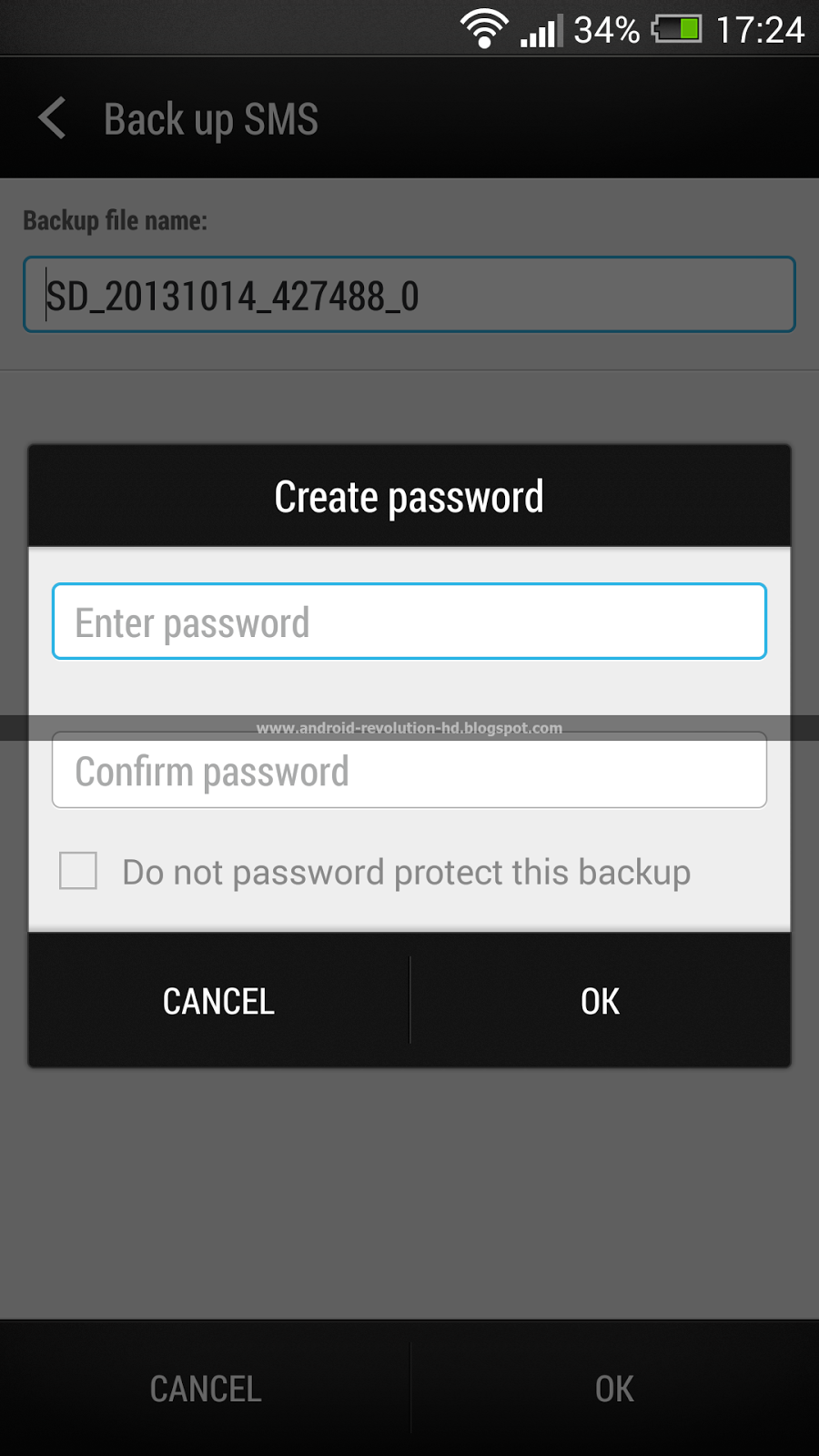
Possibility to protect SMS backup with password. I believe that every "security" or "privacy" related update is important, even if most users won't probably use it.


"Stay awake" is finally back in Developer options in Settings. Taken away few months ago and desperately desired by users and developers.


Up to 6 (previously 5) home-screen panels including BlinkFeed screen. In my personal opinion 6 is weird number because this little thin line, also known as screen indicator can never be in the centre. This can be little confusing when using the device.


"Do not disturb" mode accessible via Quick Settings panel. Really great feature if you don't want to be waken up few times during the night!

More details coming soon!

Have any questions or comments? Feel free to share! Also, if you like this article, please use media sharing buttons (Twitter, G+, Facebook) below this post!

Meet the HTC One Max, a Supersized HTC One


That big, bold beauty pictured above is the HTC One Max. There have been more than a few leaks about this product. Why? There's a lot to love - literally and figuratively. Let's start with a quick video introducing the product:


The HTC One Max is everything you love about the HTC One, supersized! Here's the list of the most important device features:
  • A massive 5.9 inch, 1080p display (Super LCD3)
  • A gigantic 3300 mAH internal, non-removable Lithium Polymer battery
  • A convenient rear fingerprint scanner for fast locking and launching of apps
  • A side-mounted power button for fast and easy access
  • 32 GB or 16 GB (varies by region) of internal storage, 2 GB of RAM
  • microSD card support, up to 64 GB in size
  • Android 4.3 with Sense 5.5
  • Qualcomm Snapdragon 600 processor at 1.7 Ghz
  • The same UltraPixel camera from the HTC One (4 MP, f/2.0, 28mm lens)
  • 164.5 x 82.5 x 10.29mm in size, 217 grams in weight
  • Supports Qualcomm QuickCharge 1.0, with an included 1.5A charger in the box

Battery life is the #1 thing consumers want to see improved, so if you're all about the long-lasting battery life, the HTC One Max is absolutely amazing. How amazing? Almost 55 hours of usage between charges. And this isn't putting it in power saving mode, turning things off constantly, etc. This is WiFi on, Bluetooth on, and GPS on during the daylight hours.


Part of what makes the battery life great is us using the Snapdragon 600 processor. The HTC One Max has the same screen resolution as the HTC One, which is a top performer, so the experience is the same on both devices, so while other devices in this category are shipping with the Snapdragon 800, it's the day to day experience of using the device that matters more than the specs.
How does it compare, size-wise, to the HTC One and HTC One mini? A picture says it all:


Make no mistake, this is a big phone, but it's amazing how quickly you can adapt to the larger size.
It's worth pointing out how great gaming is on a 5.9 inch screen. BoomSound is incredible - the speaker chambers are larger, so it's even louder than the HTC One - and the camera experience is amazing with such a large screen. Sharing photos and videos with others on a 5.9 inch screen is a great experience!
Availability on specific carriers, and pricing, will be announced in the coming days/weeks. The best thing you can do is contact your wireless carrier via Twitter and ask them when the HTC One Max is coming - they need to see the enthusiasm consumers have for our phones. Remember the carrier decides whether or not to carry our phones and sell them to you.


Full specification:

SIZE: 164.5 x 82.5 x 10.29mm 
WEIGHT: 217g
DISPLAY: 5.9” Full HD 1080p
CPU: Qualcomm® Snapdragon™ 600, 1.7GHz quad-core CPUs
PLATFORM: Android™ 4.3 with HTC Sense™ 5.5
MEMORY: Total storage:  16GB/32GB | RAM: 2GB | Expansion card slot: Supports microSD™ 
SIM: micro SIM
SENSORS: Gyro sensor | Accelerometer | Proximity sensor | Ambient light sensor | Fingerprint scanner
CONNECTIVITY
  3.5 mm stereo audio jack
  NFC
  Bluetooth® 4.0 with aptX™ enabled 
  Wi-Fi®: IEEE 802.11 a/ac/b/g/n
  DLNA® for wirelessly streaming media from the phone to a compatible TV or computer
  HTC Connect™ 
  Support consumer infrared remote control
  micro-USB 2.0 (5-pin) port with mobile high-definition video link (MHL) for USB or HDMI connection
SOUND: HTC BoomSound™ | Dual frontal stereo speakers with built-in amplifiers | Sense Voice
CAMERA:
  HTC UltraPixel Camera
  BSI sensor, Pixel size 2.0 µm, Sensor size 1/3'
  Dedicated HTC ImageChip™ 2
  f/2.0 aperture and 28 mm lens
  Smart Flash: Five levels of flash automatically set by distance to subject
  1080p Full HD video recording with HDR video
  Front Camera: 2.1 MP, 88° wide angle lens with HDR capability
  Front Camera: 1080p Full HD video recording.  
  HTC Zoe™ with Sequence Shot, Always Smile and Object Removal
  Gallery with Video Highlights and HTC Share
  Continuous shooting and VideoPic
BATTERY: Embedded rechargeable Li-polymer battery | Capacity: 3300 mAh
GPSGPS/AGPS | Digital Compass
AC ADAPTER: Voltage range/frequency: 100 ~ 240 V AC, 50/60 Hz | DC output: 5 V and 1.5 A


Have any questions or comments? Feel free to share! Also, if you like this article, please use media sharing buttons (Twitter, G+, Facebook) below this post!

mardi 8 octobre 2013

HTC Sense 5.5 busted! True screenshots of the incoming HTC UI

It's been some time since we have had HTC Sense 5.0 on the market. In the past few weeks this, considered by many as the best Android UI, also has been released for HTC One X and HTC One X+.

We already know for a few months, that HTC has already been working on the next version of their famous UI - HTC Sense 5.5. Some of the Sense 5.5 features are already present in the latest HTC One Android 4.3 build, however they are currently disabled in the framework.

Today, we present to you the first screenshots of the incoming HTC Sense 5.5 interface. If you are going to share this great news, please don't forget to include the source link too!


Home screen - now you can disable or enable HTC BlinkFeed easily.


Android Quick Settings - now you can re-arrange the content of the QS panel.


Improved HTC keyboard with possibility to add more emoticons.


Improved camera - "Dual capture" and "Panorama+", Storage and Recent Apps panel.


New HTC BlinkFeed categories, custom topics tab and minor changes to alarm clock.


Many more changes are of course under the hood, so expect improved performance and overall UI smoothness. Many bugs are also fixed, so the incoming HTC Sense 5.5 should bring a lot of joy for all HTC fans!

Have any questions or comments? Feel free to share! Also, if you like this article, please use media sharing buttons (Twitter, G+, Facebook) below this post!

vendredi 4 octobre 2013

HTC One won "Gadget of the Year" by T3


Since the release date, the HTC One has won almost every smartphone contest. It's won awards on many sites because of its unique design and great performance in conjunction with my favourite Android custom UI - HTC Sense. Now, months after the launch event in London, the HTC One has won yet another slew of awards - T3 Gadget of the Year, T3 Phone of the Year and finally T3 Design Award 2013! We are not hiding the fact that we are not surprised!
"The HTC One is a product designed to save a company in financial trouble – and it seems HTC’s design and engineering team work well with their backs against the wall.
This Android phone is the best product HTC has ever built, with a gorgeously thin, reassuringly rigid aluminium body bonded to the 4.7-inch screen by a technique that doesn't leave a single gap. And speaking of the screen, it’s eyeball-piercingly sharp, with a 1080p full HD resolution and Retina display-spanking pixel density of 468ppi. It’s one of a handful of phones that can be mentioned in the same breath as the iPhone when it comes to looks and build quality.
Performance is no less impressive, with the quad-core processor blazing through tasks with nary a trace of lag and the 4MP Ultrapixel camera serving up some of the finest snaps we've ever seen from a smartphone."
Source: Awards T3

Android Revolution HD in courtesy of HTC is giving away brand new HTC One to the lucky winner of the giveaway #RevolutionChange contest. Don't miss it!

Have any questions or comments? Feel free to share! Also, if you like this article, please use media sharing buttons (Twitter, G+, Facebook) below this post!

vendredi 27 septembre 2013

Android 4.3 for HTC One now available for everyone


As previously promised here, the new Android Revolution HD based on Android 4.3 and HTC Sense 5.0 is ready for everyone to download.

HTC hasn't released yet the international (WWE) update for HTC One, so users with international version of HTC One (M7_UL) are still waiting for Android 4.3 to come. As a workaround, Android Revolution HD is based on recently released Android 4.3 OTA for HTC One "Developer Edition". By checking byte to byte it's quite easy to notice that the software from international edition (401) and developer edition (1540) are almost the same. So instead of waiting for WWE OTA, Android Revolution HD 22.0 has been "WWE-ed", which means it works identically to WWE software. All WWE languages are included.

So, if you don't want to wait for WWE OTA update for your HTC One, please visit this thread and get the latest Android Revolution HD 22.0 with Android 4.3 and HTC Sense 5.0.

Have any questions or comments? Feel free to share! Also, if you like this article, please use media sharing buttons (Twitter, G+, Facebook) below this post!

vendredi 11 mars 2011

Android Users Can Now Explore Their New Phones Independently

Keyboard Tutor is a new Android app from the eyes-free project that can help you locate and learn about the keys on your physical keyboard, and any other physical buttons on your phone. Just start the app, and press any button to hear a description of that button spoken.


You can download Keyboard Tutor from the android market.

dimanche 6 mars 2011

Android Access Lets Users Review Apps for Accessibility

The following was posted to the Eyes-Free list today by J.J. Meddaugh of A T Guys.

A T Guys is pleased to announce a new website for the accessible Android community. Android Access offers information, ratings, and accessibility reviews for dozens of accessible Android applications.

Users can
• Post reviews of apps they've tried.
• View tips and tricks submitted by others.
• Learn more about how to get started with the Android operating system.
• Stay up to date with the latest news and features.

We are thrilled to bring this free service to the Android community, and look forward to your comments, suggestions, and submissions.

Click here to visit Android Access.

mercredi 2 mars 2011

Mobile Accessibility: Code Factory Goes Android

Mobile Accessibility: Code Factory Goes Android!

Features
• Touchscreen Navigation
• Speech Recognition
• Web and Email Access
• Nuance’s Vocalizer® Text-to-Speech

FOR IMMEDIATE RELEASE
Terrassa (Barcelona), Spain, March 2nd, 2011

Today, Code Factory is delighted to introduce Mobile Accessibility, a screen-access application that allows people who are blind or have low vision to use an Android phone in an intuitive, easy and simple way. Mobile Accessibility is the first accessible Android application that permits intuitive touchscreen navigation of Android phones, featuring text readback via natural sounding voices powered by Nuance’s Vocalizer® text-to-speech technology.

“Mobile phones have proved to be among the fastest-changing consumer technologies in the world – particularly with the advent of the Android platform. So making mobile phones accessible to the blind and visually impaired is therefore challenging, fascinating, thrilling and totally exciting all at the same time,” explained Eduard Sánchez, Code Factory’s CEO. “There was no doubt that we would target the Android platform, as we very quickly realized that there was a real need in this specific market for an accessible solution that can provide a user-friendly experience for all blind and low-vision consumers. Mobile Accessibility allows everyone, from beginners to the most tech-savvy, to use an Android phone, no matter if it has physical keys or is touchscreen-only.”

Mobile Accessibility Is Two Products in One:

• A suite of 10 accessible applications (Phone, Contacts, SMS, Alarm, Calendar, Email, Web, Where am I, Apps and Settings) that have been specially designed for the blind and visually impaired. They all have a simplified interface whose textual information is spoken using Nuance Vocalizer® voice synthesis.
• A screen reader that allows users to get out of the suite and navigate the standard interface of their phone.

“Mobile Accessibility provides both access to the mainstream apps of the phone and access to special apps for blind people. Why? Because our philosophy has always been to allow our users to use the phone the same way as everyone else. However, we also believe that having some special apps for the most common tasks can be extremely useful if it means gaining in productivity,” added Eduard Sánchez.

The Major Features of Mobile Accessibility Are the Following:

• Touch navigation: You can use Mobile Accessibility not only with the trackball or the physical keyboard of your phone, but also with its touchscreen! Simply move your finger around the screen and the voice synthesis will read the text located under your finger. Or if you prefer, you can also swipe up/down/right/left and tap on the screen to navigate through the interface. And if you wish you can enable sound and vibration feedback.
• Easy to input text: In or outside the Mobile Accessibility suite you can use the touch QWERTY keyboard as well as the speech recognition to write text quickly and easily. Imagine writing an SMS or an Email using your voice only.
• Voice synthesis: Code Factory has been making mobile phones accessible to the blind and visually impaired for many years now, and they know that the voice matters... and a lot! For Mobile Accessibility, Code Factory has partnered with Nuance® to leverage its trusted Vocalizer text-to-speech technology, providing consumers with natural sounding voice readback.

“With around 314 million visually impaired persons around the world, we believe that it’s our joint obligation to facilitate access to information and mobile communication to everyone” says Arnd Weil, VP & General Manager Automotive / Consumer Electronics, Nuance Communications. “By offering screen reader functionality for Android phones using Nuance Vocalizer, Code Factory gives blind and visually impaired persons access to one of the most important mobile platforms with the market’s most natural sounding and intelligible voices.”

Inside the Mobile Accessibility Suite of Accessible Applications You Can Do the Following:

• Phone: Make calls, answer calls, hear the caller ID and manage your call log.
• Contacts: Manage your contacts, even those from social networks such as Facebook.
• SMS: Compose and read short messages. Manage conversations.
• Alarms: Set your alarms.
• Web: Full web browser experience, similar to what you can find on your PC. Jump by the control of your choice (links, paragraphs, headings, forms, etc.) to navigate faster to the information of your interest. Bookmark your favourite webpages.
• Calendar: Create, edit and delete a calendar entry. View all events per day, week or month.
• Email: Full access to your Gmail account
• Where am I? : GPS application that gives you updates on your current location.
• Settings: Change ringtone. Configure feedback and notifications (vibration or audio). Configure keyboard echo, punctuation verbosity, speech pitch and rate, etc.
• Quick access to date and time, phone status information such as battery level and network coverage, number of missed calls and unread messages, etc.

To hear Mobile Accessibility in action listen to videos and audio demos.

Mobile Accessibility supports all Android phones from version 2.1 and above. Please note that voice recognition is only supported with version 2.2 and above. Note also that if you want to use the screen reader functionality of Mobile Accessibility you will need a phone with physical navigational controls such as a trackball or trackpad. Click here to find more information about Android phones.

At the time of this release Mobile Accessibility is only available in English, but soon Code Factory will release other versions of Mobile Accessibility for Spanish, Italian, German, French and Portuguese. Note that Mobile Accessibility doesn’t support multiple languages at one time. If you buy the English version of Mobile Accessibility you will not be able to use it in another language like French or Spanish. There will be a specific version of Mobile Accessibility for each language and each version will have to be purchased separately.

You can now get a Mobile Accessibility Demo from the Android Market and try the product for free for 30 days:

Click here for Mobile Accessibility Demo US.

Click here for Mobile Accessibility Demo UK

Soon Mobile Accessibility will be available for purchase through the Android Market at the price of 69 EUROS. You can purchase the application directly from the Market application of your Android phone, or from the Market web page. Before buying the app make sure to check out our website to see what carriers offer the product for free to their customers.

To learn how to use Mobile Accessibility for Android, please consult the user guide.
For technical assistance, please submit a ticket through Code Factory’s Help Desk.

For more information about Mobile Accessibility and Code Factory subscribe to the Mobile Accessibility mailing list.,
visit our website,
or follow the company on Twitter and use the hashtag #MA to talk about Mobile Accessibility.

About Code Factory

Founded in 1998 and headquartered in Terrassa (Barcelona), Spain, Code Factory is the global leader committed to the development of products designed to eliminate barriers to the accessibility of mobile technology for the blind and visually impaired. Today, Code Factory is the leading provider of accessible mobile applications such as screen readers, screen magnifiers, and Braille interfaces. Code Factory’s products are compatible with the widest range of mainstream mobile devices running on Symbian, Windows Mobile, BlackBerry Smartphones, and Android. Among Code Factory's customers are well known organizations for the blind such as ONCE in Spain, and carriers such as AT&T, Bouygues Telecom, SFR, TIM and Vodafone.

About Nuance Communications, Inc.

Nuance is a leading provider of speech and imaging solutions for businesses and consumers around the world. Its technologies, applications and services make the user experience more compelling by transforming the way people interact with information and how they create, share and use documents. Every day, millions of users and thousands of businesses experience Nuance’s proven applications and professional services. For more information, please visit Nuance.com.

mardi 1 mars 2011

TouchType Is Now Available

Nolan Darilek, the developer of the Spiel screen reader, posted the following to the Eyes-Free Android list. His new app is a free download from the Android Market:

Touchtype is an accessible on-screen keyboard for Android devices, inspired heavily by that found in Apple's IOS. Open source released under the Apache 2.0 license, Touchtype is useful even without the on-screen keyboard, as it also solves several accessibility flaws in Android's input-handling. Find it in the Android Market, or at
http://dev.thewordnerd.info/touchtype
where you'll also find installation and usage instructions.

Note: please read the *entire main page* before asking questions or offering feedback, as the FAQ addresses many of the most common questions I've received.

Enjoy.

I'll try popping into the eyes-free list from time to time, but for a quicker response, please ask any questions on the Spiel group.

mardi 8 février 2011

Apps4Android Releases 6 Accessibility App Installers (AAIs) and 37 Voices in 25 Languages

On February 6, Apps4Android announced the release of two new products. One is a set of carrier specific accessibility app installers (AAIs) for Android users living in and out of the United States. The other is a set of new voices in a wide range of languages.

The following has been excerpted from the announcement. To read the complete press release in html, click here. To read a Word version of the release, click here.

The apps can be found on the Android Market by searching for Apps4Android.

Apps4Android’s AAIs:

Apps4Android’s AAIs are carrier-specific applications designed to make it easy and intuitive for wireless carrier retail store personnel, help desk professionals, and subscribers to identify, download, and install "no-cost-to-the-subscriber" suites of third-party applications designed to enhance the accessibility of Android smart devices. Apps4Android’s AAIs identify the accessibility applications not currently installed on an Android smart device. They then walk the user through installing the missing accessibility applications.

Apps4Android’s AAIs manage the detection and installation of the following Android accessibility applications:

1. Accessibility Preferences (Developer: Google Eyes-Free Team) Enables users to easily modify settings for accessibility applications such as TalkBack.
2. Eyes Free Shell (Developer: Google Eyes-Free Team) Permits the use of an Android smart device as an eyes-free communicator.
3. IDEAL Item Identifier® (Apps4Android) Takes pictures of standard UPC and QR codes and voices the description of the item using Google’s TTS voices. It also enables users to create talking barcodes.
4. IDEAL Magnifier® (Apps4Android) Turns most Android smart devices into handheld video magnifiers.
5. IDEAL Web Access Pack® (Apps4Android) Enables individuals with print disabilities to easily surf the Web.
6. K-9 Mail® (Apps4Android and K-9 Dog Walkers) Fully accessible Android e-mail client that includes the ability to create, send, receive, and read e-mail messages. Other features include search, push e-mail, multi-folder sync, flagging, filing, signatures, bcc-self, mail on SD and more! K-9 Mail supports IMAP, POP3, and Exchange (with WebDAV).
7. KickBack (Developer: Google Eyes-Free Team) provides haptic (vibratory) feedback in response to various events taking place on Android smart devices
8. Rock Lock (Developer: Google Eyes-Free Team) A fully accessible music player.
9. SoundBack (Developer: Google Eyes-Free Team) Provides non-spoken, auditory feedback in response to various events taking place on Android smart devices.
10. TalkBack (Developer: Google Eyes-Free Team) Provides screenreading functionality to native Android applications on Android devices.
11. Talking Dialer (Developer: Google Eyes-Free Team) Enables users to dial phone numbers in an eyes-free environment.
12. Walky Talky (Developer: Google Eyes-Free Team) Accessible GPS navigation aids.
13. Intersection Explorer (Developer: Google Eyes-Free Team) Accessible GPS navigation aids.

Apps4Android AAIs have been released for:

1. AT&T® Android smart device users in the United States.
2. Sprint® Android smart device users in the United States.
3. T-Mobile® Android smart device users in the United States, Austria, Czech Republic, Germany, United Kingdom, Netherlands, and Poland.
4. Verizon® Android smart device users in the United States.
5. Vodafone® Android smart device users in Australia, Switzerland, Germany, Spain, France, United Kingdom, Greece, Ireland, Italy, Netherlands, New Zealand, Portugal, and Romania.
6. Optus® in Australia, Orange® in France, DOCOMO®, SoftBank®, and au by KDDI® in Japan, Singtel® in Singapore, nTelos® in the United States, and all other carrier’s Android smart device users in all other countries including Argentina, Belgium, Brazil, Bulgaria, Canada, Croatia, Denmark, Estonia, Finland, Hong Kong, Hungary, India, Israel, Japan, Kazakhstan, Latvia, Lithuania, Luxembourg, Mexico, Norway, Philippines, Russia, Serbia, Singapore, Slovakia, Slovenia, South Africa, South Korea, Sweden, Taiwan, and Thailand.

Best Voices for Android®:

All of Apps4Android's accessibility applications incorporate the use of text-to-speech voices. Because of this, and because many text-to- speech users prefer high-quality human-sounding voices, Apps4Android is pleased to release "Best Voices for Android." Voices are available in 25 languages including a total of 37 voices.

"Best Voices for Android" languages include Arabic, Brazilian Portuguese, Canadian French, Cantonese, Czech, Danish, Dutch, European Spanish, Finnish, French, German, Greek, Hungarian, Italian, Japanese, Korean, Mandarin, Mexican Spanish, Norwegian, Portuguese, Russian, Swedish, Turkish, UK English, and U.S. English.

Best Voices for Android® not only provides the ability to purchase the best voices on the market, it permits users to sample the voices before purchasing them! Even better, Best Voices for Android® are only $2.99 each!

Important note: "Best Voices for Android" will only run on smart devices running Android version 2.2 (Froyo) and above.